AI Contact Center
Product Design · Telefonica
Claude Code
Figma MCP
Agile
A high-fidelity prototype of an AI-agent builder
A portal for building, testing and evaluating the AI agents behind customer care, part of the AI Contact Center program. Built as a high-fidelity, navigable prototype for a demo, it came together through an AI-assisted workflow: Claude read the Figma designs directly through the Figma MCP (a tool that connects Claude to Figma), under close design direction throughout.
01 Context & problem
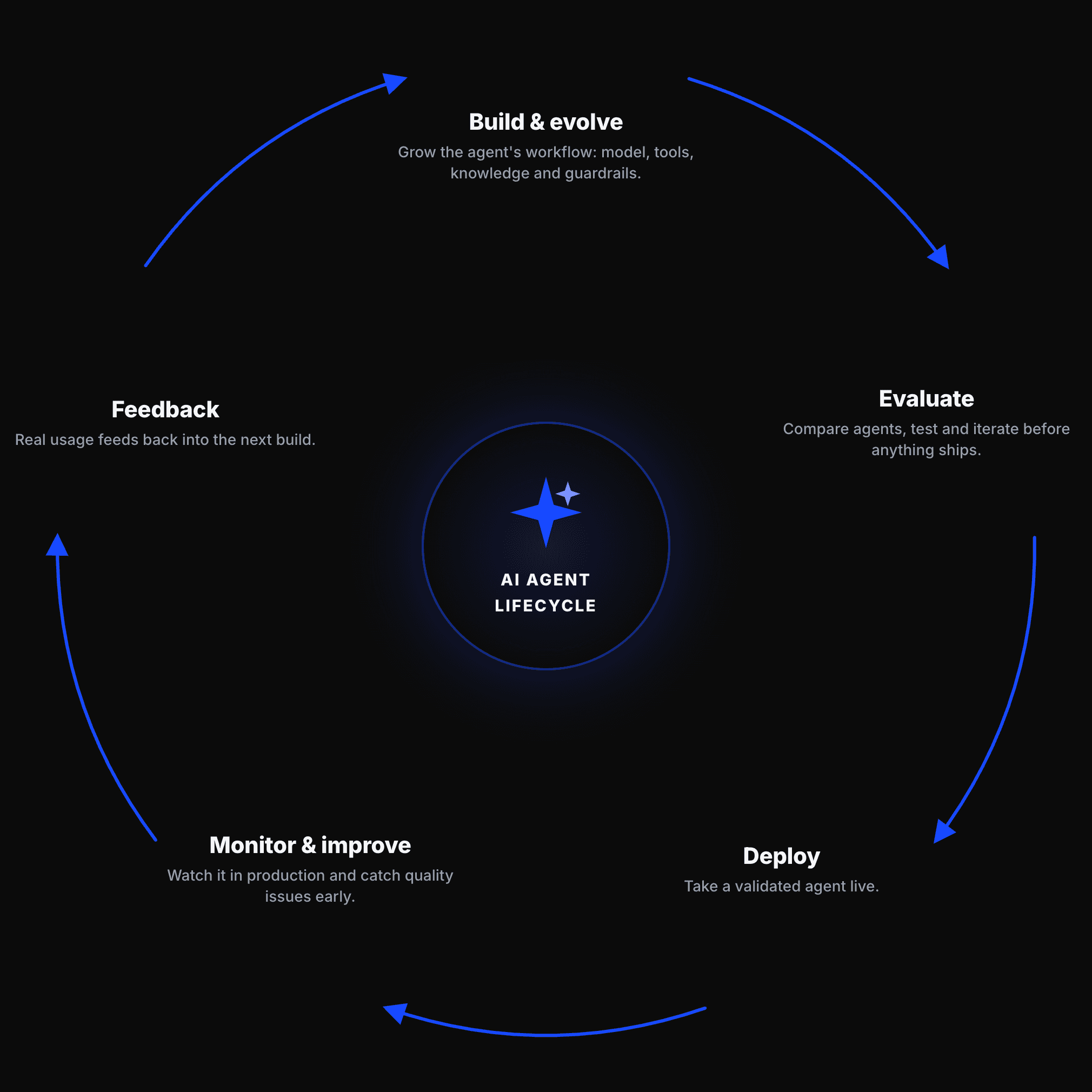
The AI Contact Center aims to build a highly automated contact center where AI agents take the lead in resolving customer needs, across text, voice and image, with human intervention kept to a minimum. For that to work, teams first need a way to create those agents, try them out, and check they behave well before they ever reach a customer. An AI agent can look perfectly fine on a technical level, switched on, responding, no crashes, while quietly giving worse answers, drifting away from the tone it should have, or even inventing information (often called hallucinating). That is much harder to catch than checking whether a service is simply running. Early user research made this clear: the teams who manage these agents needed a fast, trustworthy way to tell whether an agent was actually doing its job well, not just whether it was switched on. The portal was designed to be that workspace: a place to build an agent (its model, tools, knowledge and guardrails), test it in a playground, run evaluations and monitor how agents perform. The goal for this phase was a high-fidelity, navigable prototype convincing enough to demo the vision on video. At this point there were no PRDs from the different product managers yet, and no exact documentation either, because no technical, engineering or any other decisions had been made. What we were actually doing was selling an idea for a complete portal: showing what we could design and build ahead of that definition, so we could walk into a client conversation with something far more concrete, rather than building the final product from zero. That is what let us stay so agile, turning around a navigable prototype in just a few days, one the client could see and click through for themselves instead of having it described to them. Before this portal, the people who build, test and run these agents had to work across several separate tools, with nothing tying the process together. The portal was designed as one desktop workspace for the whole team, where each role has its own path through it: some mainly check how agents are behaving day to day, others build and fine-tune an agent, others take a validated agent live, and an administrator manages who can access what.
02 My role
I worked alongside another product designer, the two of us contributing equally to the design and the build of the navigable high-fidelity prototype. Together we translated the Figma screens into a working demo and directed an AI-assisted workflow end to end: deciding what to build, setting the quality bar and validating every screen. Different product managers each owned a part of the portal and sent us the detail for their section, which we turned into design and prototype. The work was localised for the target market, so the prototype was built bilingually. The project has run in two phases: first the high-fidelity prototype that sold the vision, and now the design of the real product, which is ongoing. Delivery is organised in drops, successive releases that each add more of the portal, and I am currently designing the definitive screens for the first one, within real technical constraints, in close conversation with the many engineering and product teams building it underneath. A large part of this work is not the screens themselves, but making a design decision work for everyone who depends on it. Before anything moves forward I need buy in from several different teams, not only engineering, so I translate each decision into terms that make sense for each of them, and adjust the design when a real constraint comes up, technical or otherwise, without losing sight of the person who will actually use the product.


03 Process
The interesting part is how AI ran through the work itself. We started from an original demo built by the product managers, redesigned parts of it, and brought it back to life by animating and prototyping with Claude and the Figma MCP. I acted as the design director: I decided what to build and validated every screen, while Claude, reading Figma directly through the MCP, implemented it.

04 Solution & key decisions
A portal to build, test and evaluate AI agents, delivered as a high-fidelity, navigable prototype faithful to Figma and the Mística design system for a self-contained demo, covering the full lifecycle of an agent from creation to evaluation. The research team ran usability sessions on the prototype with real users, and their findings shaped several decisions. A raw number on its own was not enough, so every score in the portal comes with context that explains what it means and whether it is good or bad. The interface also had to work for people without a technical background, so I kept the language and the visual status simple and easy to read at a glance.
Build an agent on a canvas
A visual canvas where you grow an agent by adding branches: its LLM model, tools, knowledge base and guardrails.
Test and compare with AI
An AI chat that interacts with the user and compares several agents at once, so behaviour can be tried safely before shipping.
Evaluate and monitor
An evaluation wizard and dashboards to launch assessments, catch regressions before promoting a new version, and track how agents perform.
Extended the design system
Where Mística did not yet cover novel needs like an AI chat, I built a small extended component library for the project.

Demo Portal
Demo Portal
05 Impact & learnings
The prototype became a video used to pitch the agent portal to the client team, and it visibly sped up conversations by showing what was intended rather than describing it. The vision was approved, and the portal is now in real development, with the design moving from prototype to the definitive screens for the first real version.
Outcome
the prototype became a video used to pitch the agent portal to the client team, and it visibly sped up conversations by showing what was intended rather than describing it. The vision was approved, and the portal is now in real development, with the design moving from prototype to the definitive screens for the first real version.
The challenge
The field moved fast. Concepts and requirements shifted throughout the project, so we kept learning and adapted the design to the speed at which AI itself was evolving.
What I learned
How to use AI at the key phases of a project, to prototype screens in a few hours and turn abstract ideas into something visual that moves conversations with product managers and clients forward. Underneath it, the craft that keeps AI faithful to the design: Figma as the source of truth, tokens over guesses, and a pixel-perfect loop.
Where I added value
I set the design direction and the quality bar, turned Figma screens into a believable, interactive demo without losing fidelity, and introduced a way of working: designing with the goal of showing ideas and concepts visually, fast, and with AI.

This is a very ambitious project, with many teams and profiles involved, and it is still under way: there is no fully delivered final product yet. I have been part of it from the very start, from the initial idea through presenting the vision, and now into designing the real product, with its evolution guided by real usage data rather than assumptions.
Ver todo el proceso en mi Behance
AI Contact Center
Product Design · Telefonica
Claude Code
Figma MCP
Agile
A high-fidelity prototype of an AI-agent builder
A portal for building, testing and evaluating the AI agents behind customer care, part of the AI Contact Center program. Built as a high-fidelity, navigable prototype for a demo, it came together through an AI-assisted workflow: Claude read the Figma designs directly through the Figma MCP (a tool that connects Claude to Figma), under close design direction throughout.
01 Context & problem
The AI Contact Center aims to build a highly automated contact center where AI agents take the lead in resolving customer needs, across text, voice and image, with human intervention kept to a minimum. For that to work, teams first need a way to create those agents, try them out, and check they behave well before they ever reach a customer. An AI agent can look perfectly fine on a technical level, switched on, responding, no crashes, while quietly giving worse answers, drifting away from the tone it should have, or even inventing information (often called hallucinating). That is much harder to catch than checking whether a service is simply running. Early user research made this clear: the teams who manage these agents needed a fast, trustworthy way to tell whether an agent was actually doing its job well, not just whether it was switched on. The portal was designed to be that workspace: a place to build an agent (its model, tools, knowledge and guardrails), test it in a playground, run evaluations and monitor how agents perform. The goal for this phase was a high-fidelity, navigable prototype convincing enough to demo the vision on video. At this point there were no PRDs from the different product managers yet, and no exact documentation either, because no technical, engineering or any other decisions had been made. What we were actually doing was selling an idea for a complete portal: showing what we could design and build ahead of that definition, so we could walk into a client conversation with something far more concrete, rather than building the final product from zero. That is what let us stay so agile, turning around a navigable prototype in just a few days, one the client could see and click through for themselves instead of having it described to them. Before this portal, the people who build, test and run these agents had to work across several separate tools, with nothing tying the process together. The portal was designed as one desktop workspace for the whole team, where each role has its own path through it: some mainly check how agents are behaving day to day, others build and fine-tune an agent, others take a validated agent live, and an administrator manages who can access what.
02 My role
I worked alongside another product designer, the two of us contributing equally to the design and the build of the navigable high-fidelity prototype. Together we translated the Figma screens into a working demo and directed an AI-assisted workflow end to end: deciding what to build, setting the quality bar and validating every screen. Different product managers each owned a part of the portal and sent us the detail for their section, which we turned into design and prototype. The work was localised for the target market, so the prototype was built bilingually. The project has run in two phases: first the high-fidelity prototype that sold the vision, and now the design of the real product, which is ongoing. Delivery is organised in drops, successive releases that each add more of the portal, and I am currently designing the definitive screens for the first one, within real technical constraints, in close conversation with the many engineering and product teams building it underneath. A large part of this work is not the screens themselves, but making a design decision work for everyone who depends on it. Before anything moves forward I need buy in from several different teams, not only engineering, so I translate each decision into terms that make sense for each of them, and adjust the design when a real constraint comes up, technical or otherwise, without losing sight of the person who will actually use the product.
03 Process
The interesting part is how AI ran through the work itself. We started from an original demo built by the product managers, redesigned parts of it, and brought it back to life by animating and prototyping with Claude and the Figma MCP. I acted as the design director: I decided what to build and validated every screen, while Claude, reading Figma directly through the MCP, implemented it.
04 Solution & key decisions
A portal to build, test and evaluate AI agents, delivered as a high-fidelity, navigable prototype faithful to Figma and the Mística design system for a self-contained demo, covering the full lifecycle of an agent from creation to evaluation. The research team ran usability sessions on the prototype with real users, and their findings shaped several decisions. A raw number on its own was not enough, so every score in the portal comes with context that explains what it means and whether it is good or bad. The interface also had to work for people without a technical background, so I kept the language and the visual status simple and easy to read at a glance.
Build an agent on a canvas
A visual canvas where you grow an agent by adding branches: its LLM model, tools, knowledge base and guardrails.
Test and compare with AI
An AI chat that interacts with the user and compares several agents at once, so behaviour can be tried safely before shipping.
Evaluate and monitor
An evaluation wizard and dashboards to launch assessments, catch regressions before promoting a new version, and track how agents perform.
Extended the design system
Where Mística did not yet cover novel needs like an AI chat, I built a small extended component library for the project.
Demo Portal
Demo Portal
05 Impact & learnings
The prototype became a video used to pitch the agent portal to the client team, and it visibly sped up conversations by showing what was intended rather than describing it. The vision was approved, and the portal is now in real development, with the design moving from prototype to the definitive screens for the first real version.
Outcome
the prototype became a video used to pitch the agent portal to the client team, and it visibly sped up conversations by showing what was intended rather than describing it. The vision was approved, and the portal is now in real development, with the design moving from prototype to the definitive screens for the first real version.
The challenge
The field moved fast. Concepts and requirements shifted throughout the project, so we kept learning and adapted the design to the speed at which AI itself was evolving.
What I learned
How to use AI at the key phases of a project, to prototype screens in a few hours and turn abstract ideas into something visual that moves conversations with product managers and clients forward. Underneath it, the craft that keeps AI faithful to the design: Figma as the source of truth, tokens over guesses, and a pixel-perfect loop.
Where I added value
I set the design direction and the quality bar, turned Figma screens into a believable, interactive demo without losing fidelity, and introduced a way of working: designing with the goal of showing ideas and concepts visually, fast, and with AI.
This is a very ambitious project, with many teams and profiles involved, and it is still under way: there is no fully delivered final product yet. I have been part of it from the very start, from the initial idea through presenting the vision, and now into designing the real product, with its evolution guided by real usage data rather than assumptions.
Ve todo el proceso en mi Behance
PRÓXIMO PROYECTO_
OGEX redesign
AI Contact Center
Product Design · Telefonica
Claude Code
Figma MCP
Agile
A high-fidelity prototype of an AI-agent builder
A portal for building, testing and evaluating the AI agents behind customer care, part of the AI Contact Center program. Built as a high-fidelity, navigable prototype for a demo, it came together through an AI-assisted workflow: Claude read the Figma designs directly through the Figma MCP (a tool that connects Claude to Figma), under close design direction throughout.
01 Context & problem
The AI Contact Center aims to build a highly automated contact center where AI agents take the lead in resolving customer needs, across text, voice and image, with human intervention kept to a minimum. For that to work, teams first need a way to create those agents, try them out, and check they behave well before they ever reach a customer. An AI agent can look perfectly fine on a technical level, switched on, responding, no crashes, while quietly giving worse answers, drifting away from the tone it should have, or even inventing information (often called hallucinating). That is much harder to catch than checking whether a service is simply running. Early user research made this clear: the teams who manage these agents needed a fast, trustworthy way to tell whether an agent was actually doing its job well, not just whether it was switched on. The portal was designed to be that workspace: a place to build an agent (its model, tools, knowledge and guardrails), test it in a playground, run evaluations and monitor how agents perform. The goal for this phase was a high-fidelity, navigable prototype convincing enough to demo the vision on video. At this point there were no PRDs from the different product managers yet, and no exact documentation either, because no technical, engineering or any other decisions had been made. What we were actually doing was selling an idea for a complete portal: showing what we could design and build ahead of that definition, so we could walk into a client conversation with something far more concrete, rather than building the final product from zero. That is what let us stay so agile, turning around a navigable prototype in just a few days, one the client could see and click through for themselves instead of having it described to them. Before this portal, the people who build, test and run these agents had to work across several separate tools, with nothing tying the process together. The portal was designed as one desktop workspace for the whole team, where each role has its own path through it: some mainly check how agents are behaving day to day, others build and fine-tune an agent, others take a validated agent live, and an administrator manages who can access what.
02 My role
I worked alongside another product designer, the two of us contributing equally to the design and the build of the navigable high-fidelity prototype. Together we translated the Figma screens into a working demo and directed an AI-assisted workflow end to end: deciding what to build, setting the quality bar and validating every screen. Different product managers each owned a part of the portal and sent us the detail for their section, which we turned into design and prototype. The work was localised for the target market, so the prototype was built bilingually. The project has run in two phases: first the high-fidelity prototype that sold the vision, and now the design of the real product, which is ongoing. Delivery is organised in drops, successive releases that each add more of the portal, and I am currently designing the definitive screens for the first one, within real technical constraints, in close conversation with the many engineering and product teams building it underneath. A large part of this work is not the screens themselves, but making a design decision work for everyone who depends on it. Before anything moves forward I need buy in from several different teams, not only engineering, so I translate each decision into terms that make sense for each of them, and adjust the design when a real constraint comes up, technical or otherwise, without losing sight of the person who will actually use the product.
03 Process
The interesting part is how AI ran through the work itself. We started from an original demo built by the product managers, redesigned parts of it, and brought it back to life by animating and prototyping with Claude and the Figma MCP. I acted as the design director: I decided what to build and validated every screen, while Claude, reading Figma directly through the MCP, implemented it.
04 Solution & key decisions
A portal to build, test and evaluate AI agents, delivered as a high-fidelity, navigable prototype faithful to Figma and the Mística design system for a self-contained demo, covering the full lifecycle of an agent from creation to evaluation. The research team ran usability sessions on the prototype with real users, and their findings shaped several decisions. A raw number on its own was not enough, so every score in the portal comes with context that explains what it means and whether it is good or bad. The interface also had to work for people without a technical background, so I kept the language and the visual status simple and easy to read at a glance.
Build an agent on a canvas
A visual canvas where you grow an agent by adding branches: its LLM model, tools, knowledge base and guardrails.
Test and compare with AI
An AI chat that interacts with the user and compares several agents at once, so behaviour can be tried safely before shipping.
Evaluate and monitor
An evaluation wizard and dashboards to launch assessments, catch regressions before promoting a new version, and track how agents perform.
Extended the design system
Where Mística did not yet cover novel needs like an AI chat, I built a small extended component library for the project.
05 Impact & learnings
The prototype became a video used to pitch the agent portal to the client team, and it visibly sped up conversations by showing what was intended rather than describing it. The vision was approved, and the portal is now in real development, with the design moving from prototype to the definitive screens for the first real version.
Outcome
the prototype became a video used to pitch the agent portal to the client team, and it visibly sped up conversations by showing what was intended rather than describing it. The vision was approved, and the portal is now in real development, with the design moving from prototype to the definitive screens for the first real version.
The challenge
The field moved fast. Concepts and requirements shifted throughout the project, so we kept learning and adapted the design to the speed at which AI itself was evolving.
What I learned
How to use AI at the key phases of a project, to prototype screens in a few hours and turn abstract ideas into something visual that moves conversations with product managers and clients forward. Underneath it, the craft that keeps AI faithful to the design: Figma as the source of truth, tokens over guesses, and a pixel-perfect loop.
Where I added value
I set the design direction and the quality bar, turned Figma screens into a believable, interactive demo without losing fidelity, and introduced a way of working: designing with the goal of showing ideas and concepts visually, fast, and with AI.
This is a very ambitious project, with many teams and profiles involved, and it is still under way: there is no fully delivered final product yet. I have been part of it from the very start, from the initial idea through presenting the vision, and now into designing the real product, with its evolution guided by real usage data rather than assumptions.